Support
We reply within 48 hours
The fastest route is inside the app itself: Settings → Support — your request reaches us with your account context attached, and you read our reply in the same place.
Or by email: support@iradaapp.com — please mention your device, your Android version, and the app version (you’ll find it in the app’s settings).
Permissions guide — step by step
Irada asks for four permissions, each with one clear reason. It asks for nothing else: not your location, not your contacts, not your browsing history.
1 Accessibility service
Blocking works through this and nothing else. Without it the app opens and stops nothing.
Device Settings → Accessibility → Installed apps → Irada → turn it on
Some devices ask “Allow Irada full control?” — the answer is yes. That is how the app reads what's displayed inside the apps you chose, to know you've hit something on your list, and it discards what it read immediately: nothing stored, nothing sent.
2 Device admin
It puts a step in front of uninstalling Irada, so it can't be a decision made in a flash of temper.
In the app → Protection → Deletion guard → enable
You can switch it off whenever you like from the same settings. We don't close a door on you without a key.
3 Notifications
This is how you learn that protection stopped, that your partner replied, and that your commitment ended.
The app asks on first launch — if you declined: Device Settings → Apps → Irada → Notifications
4 Battery optimisation exemption
Without it your phone stops Irada in the background and protection switches itself off — the single most common complaint on Xiaomi, Samsung and Oppo devices.
Device Settings → Battery → Irada → “Unrestricted” or “Allow background activity”
Screen doesn’t match what you see? Menu names differ between manufacturers and Android versions. Write to us from inside the app, tell us what you’re looking at, and we’ll walk it with you step by step.
How do I send a support request?
- Open Irada → the Settings tab.
- Scroll down to Support.
- Pick your topic, write the details, then send.
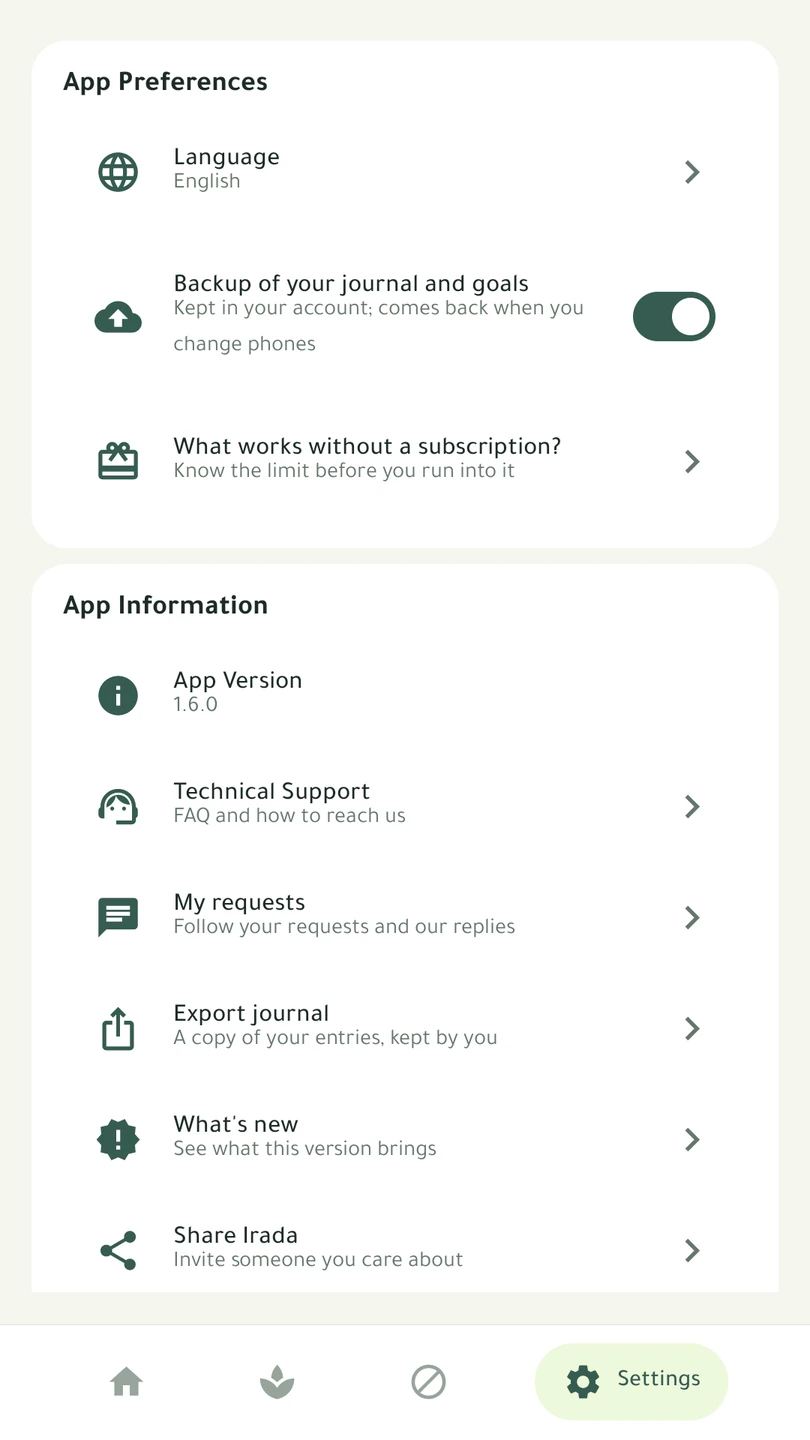
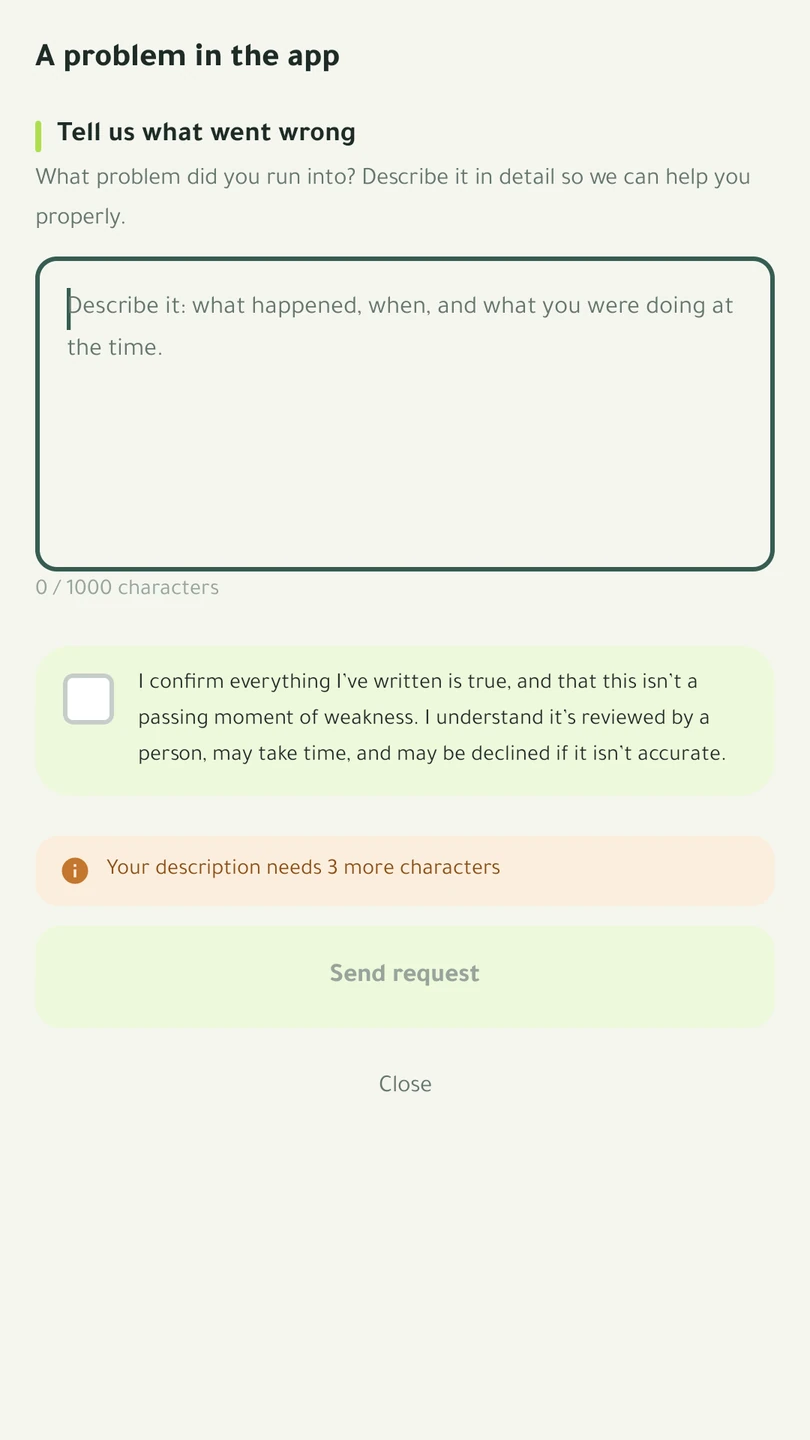
Why the questions? A request that reaches us with no context gets answered with a question, and a day is lost to it. Your answers travel with the request and order it among the others — so someone in a genuine hurry is read first.
Where do I follow my request and your reply?
Settings → My requests. Everything you’ve sent is there with its status, and when we reply it is marked “new reply” and a notification reaches you.
You can also close a request yourself once it’s sorted — and if the problem returns, write in the same conversation and it reopens, without you having to tell the story from the beginning again.
I tried and it didn’t match — is there a guide in the app?
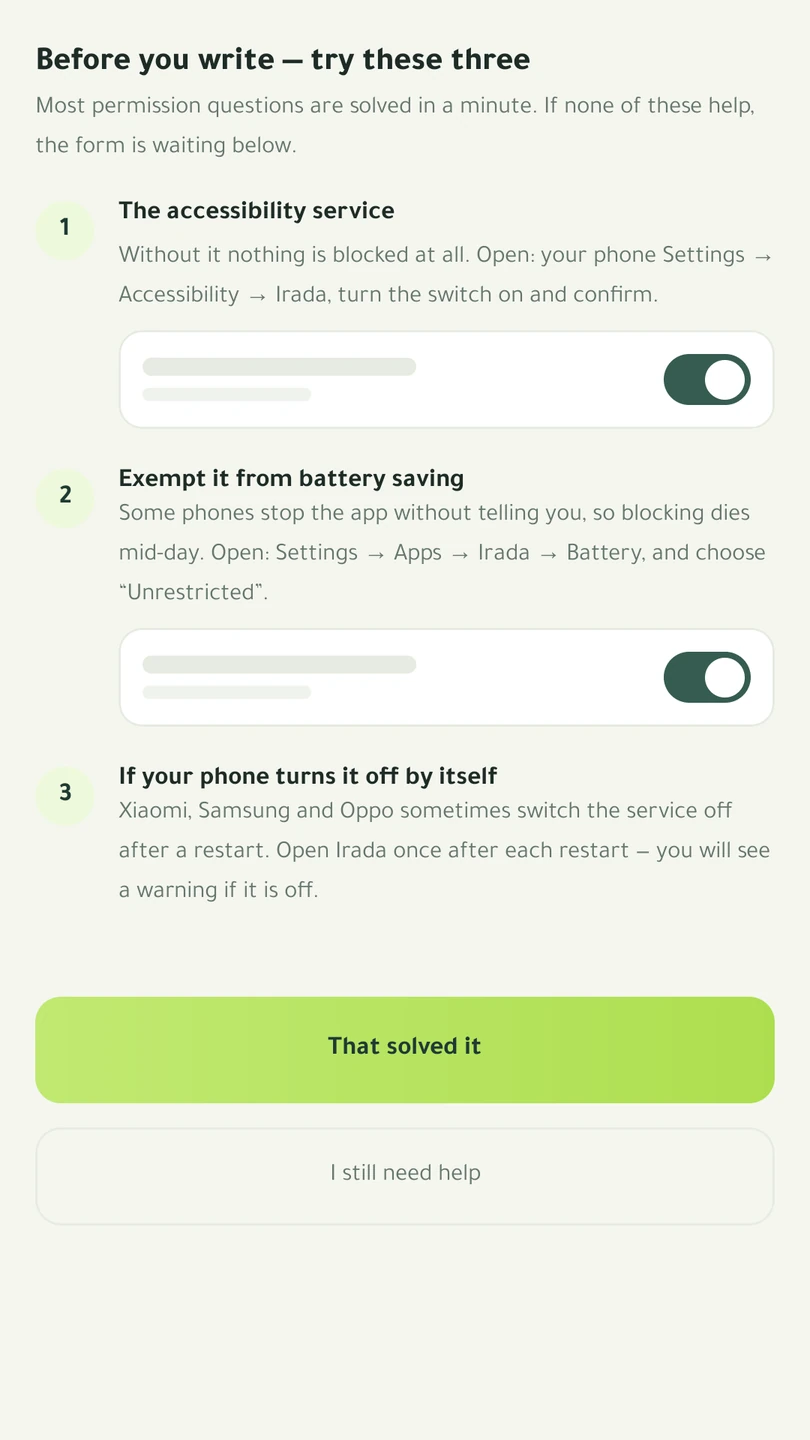
Yes. Choosing “Permissions” or “Something in the app is broken” shows three steps that settle most of what reaches us — before you write your request, and without erasing a word of what you have already typed.
Protection stopped on its own — what now?
Three causes, in the order we actually see them:
- The battery saver stopped Irada in the background — step four of the permissions guide.
- The accessibility service switched off after an app or system update — step one. Common on Samsung after every update.
- The app was force-stopped from the recent-apps screen. Open it once and it returns.
In all three the app warns you and tells your partner — protection does not stop in silence.
Common questions
Does the app see what I browse?
It reads what’s displayed inside the apps you selected — those only — to know you’ve hit something on your list, then discards it immediately. Nothing is stored, nothing is sent, nothing is logged. And the comparison happens entirely on your device: nothing passes through our servers or anyone else’s, your location doesn’t change, and it doesn’t touch your data plan.
Blocking stopped working in Snapchat or Instagram
These apps change their interfaces from time to time, which breaks section recognition. Tell us and we’ll fix it — usually remotely, without you needing to update the app.
Protection switched itself off
Usually your phone’s battery saver. See step four in the permissions guide above.
I want to end my commitment period early
There is one way: send a request from Settings → Support. We read your request, your situation and the time you have left — we may act on it, or we may decline and suggest a shorter wait — and we reply within 48 hours. The period also ends on its own if your subscription stops and isn’t renewed after the payment grace period.
Does everything stop when my subscription ends?
We will never hold your phone hostage for payment. The free features keep working: three keywords and three apps from your list — the most recent ones you added. The rest is not deleted; it pauses, is marked as paused in the list, and comes back in full the moment you subscribe. If the subscription isn’t renewed after the grace period, a commitment period you are in ends, and an accountability partner stays for three days from when the subscription stopped, then is removed unless you renew. And you can switch protection off or uninstall at any time.
How do I delete my account and my data?
In the app: Settings → Account → Delete account — it happens immediately. During a commitment period or an active partnership the app won’t delete it; you ask support to delete it instead. The full detail, and what remains after deletion, is on the account deletion page.
Can my partner see what I browse?
No. They receive the kind of event and its time only — such as “protection was switched off”. Not what you browse, not which apps you open, not your location. And they can step away whenever they like, without your permission.